Every developer has changed the way they code with the new fast advancements of AI. Therefore, the workspace where we develop software on also changed. Today we must have an AI companion (agent) to make the coding process faster. Even though it seems agents took an impactful role on software development, I still think it’s not our replacement. It’s just unbalanced. But thats another topic to talk about.
In this post I will be sharing and showing the main layout I use for development. Not how I integrate AI on projects but where I position the coding agent and different panes.
First, let’s take a look at the layout and what I see every day.
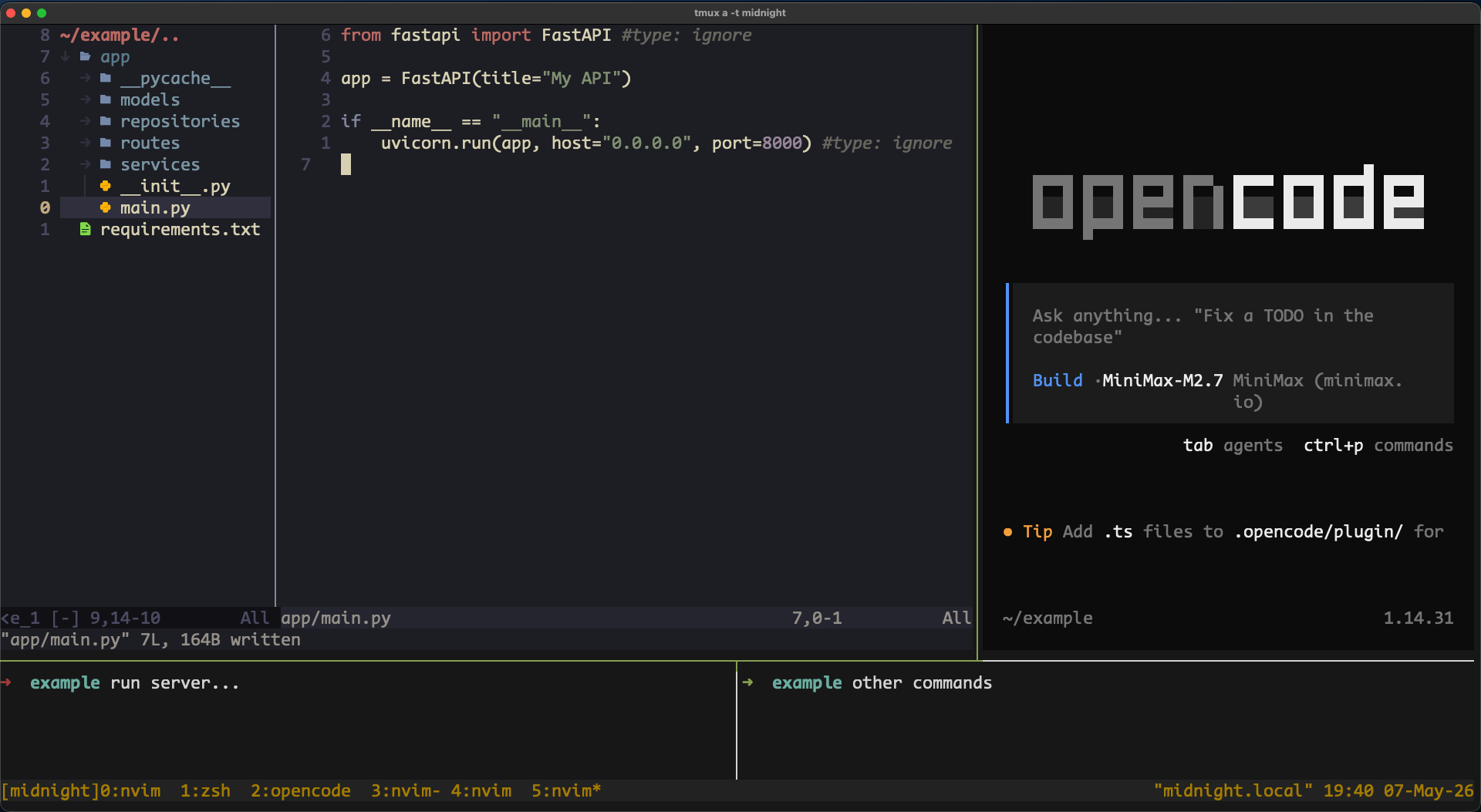
We can observe multiple panes on a single window, and each pane has it’s own purpose. With tmux multiplexer we can create and manage different sessions, windows and panes, alllowing us to separate environments or projects. Since I own a 24 inch monitor that extends my Mac Air display, having more than 4 panes on a window feels unproductive and weird, so that’s my limit for now.
The pane on the top-left is primarly for the coding editor. I’ve used Neovim for a couple years for everything now, so that’s a must on my daily workflow and goes there. Also having the pane border on the right acts as a reference point to stop typing over that line.
The top-right pane goes the coding agent. Currently, I use OpenCode for everything. The interface is ok, non-invasive, has integration with different API’s, and other funcionalities are usefull also (like sessions, skill search, etc…). Pretty good in my opinion. I went with MiniMax 2.7 for now, which in my opinion their $10 usd subscription plan is okay if you are not a hardcore token burner, output results are good also and token usage resets during working hours (UTC-4). Try it out if you are just starting with coding agents/models and have coding experience.
Then bottom-left and bottom-right we just have normal CLI panes. In most cases bottom-left is for running the app and bottom-right for command input. Nothing more than this. If I need a more larger pane to check logs or identify app errors, I just create a new window for that and remove these. OpenCode let’s you execute shell commands but personally it doesn’t feel right.
I iterate this window layout for each project if necessary. For monolith apps, I kinda separate each tmux window, one for frontend and other window for backend. If I need the project full context, I open a new fresh window with opencode on the project root. In that way, we can let the agent operate with the whole codebase.
Probably in the following months we’ll have more tools that are a must to integrate into our workflow. First we copy-pasted code on Chatgpt in 2022 and now we have this. I’ve seen people only running like 6 agents on a single window simultaneously, and nothing else. Obviously that requires a lot of prompting and high supervision so you don’t mess up complex business logic.
The idea here is to share how it looks right now vs how different it will look in the future when we use those tools. That’s why it’s more of a sharing and documenting oriented post.
— asz